One Box, One Config, One Dashboard: Home Assistant on NixOS for the Whole Household
Five ecosystems — Ikea, Sonoff, Netatmo, Tuya, Xiaomi — collapsed into one declarative NixOS box running Home Assistant, Zigbee2MQTT and Mosquitto, so the whole household controls the house from a single ~10 W interface, including the automations that decide when to air the house and when to run the night fan.
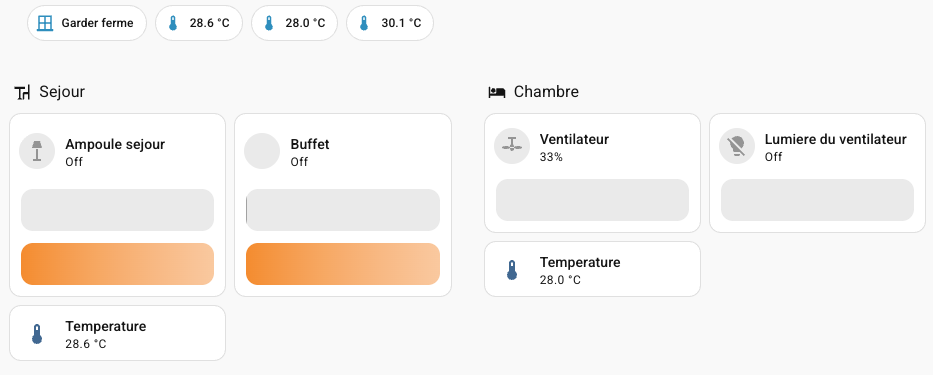
Every connected object ships its own app. It’s the first law of consumer IoT, and my house ended up with five of them: five Ikea lamps and their remotes, two Sonoff air sensors, three ceiling fans, a Netatmo CO2 sensor, a Xiaomi robot vacuum. Five apps, five accounts, five UIs — and a household where everyone else had to ask me which app controlled what.
So I built the opposite: one box, one config file, one interface. Home Assistant on NixOS, Zigbee over Zigbee2MQTT, Mosquitto as the bus. Every device in the house — regardless of radio or cloud — ends up on a single dashboard the whole household actually uses.
The box
A second-hand HP EliteDesk 800 G1 DM bought on Leboncoin — the one-litre mini-PC form factor that retired office fleets sell by the dozen. 2015-era, and the specs are exactly as modest as you’d expect:
- CPU — Intel i5-4590T (Haswell, 4 cores / 4 threads, 2.0 → 3.0 GHz, 35 W TDP)
- RAM — 8 GB DDR3-1600 (2 × 4 GB), expandable to 16 GB
- Disk — a 128 GB LITEON SATA SSD: 1,897 power-on hours, 0 reallocated sectors, SMART passed
- GPU — Intel HD 4600; QuickSync H.264 is available, left disabled in Jellyfin for now
- Zigbee — a SONOFF USB dongle (EFR32MG24) running EmberZNet 7.4.5
The numbers that matter are the ones that make you squint. The whole house of IoT idles at 8–12 W — roughly €22 a year — and the package sits at 36 °C. The disk that holds the OS, the Nix store and every backup is 11 % full. None of this is special hardware, and that’s exactly the point: a retired office PC is all the compute a smart home needs, and buying it second-hand costs less than the “smart home hub” it replaces.
Declarative all the way down
NixOS 25.11, and the entire setup is text in /etc/nixos: 15 modules, one per concern — home-assistant, zigbee2mqtt, jellyfin, tuya, xiaomi, tailscale, backup, backup-remote, aeration, presence, monitoring, hardening, power-management… even the Wi-Fi credentials are a module. Every decision I’ve made about this house is a file, rebuildable from scratch on any machine.
This pays off in the boring ways that matter. The machine garbage-collects its own Nix store — 15 GB down to 9.8 GB after the last pass, generations rotated on a 30-day schedule — so I never think about disk. Every night at 04:30 it takes a local snapshot (14 kept, restores in ten seconds, offline); at 04:45, restic pushes an encrypted copy to S3-compatible storage (7 daily / 5 weekly / 12 monthly) that survives a dead disk. The backups include /etc/nixos: the house is rebuildable from its backup, not just its data.
Layer 1 — Mosquitto: the bus
Everything speaks MQTT. Zigbee2MQTT publishes device states, Home Assistant subscribes, and any future service plugs into the same bus instead of reinventing a connection. My monitoring module publishes disk health and backup age over MQTT too — Home Assistant picks them up via discovery, with no extra daemons to babysit on a machine that’s supposed to run in a corner for years. Mosquitto itself listens on 127.0.0.1 — the bus isn’t exposed to anything.
One detail is worth knowing before it costs you a week: Mosquitto always writes an ACL file, and an empty ACL means deny everything — connections succeed, SUBACKs arrive, messages silently vanish. Zigbee2MQTT had been publishing into the void for weeks before I noticed. The fix:
services.mosquitto = {
  enable = true;
  acl = [ "pattern readwrite #" ];   # empty list = no topic for anyone
};
Layer 2 — Zigbee2MQTT: Zigbee without the hubs
The lamps and the air sensors have one thing in common: they’re Zigbee. And Zigbee needs no brand hub — just one USB dongle on the server. Zigbee2MQTT manages the mesh — ten devices today: five lamps, three wireless remotes, two air sensors — and republishes everything over MQTT. It runs on channel 25, clear of the Wi-Fi band, and the dongle’s firmware is new enough that the driver is the modern ember one (the old ezsp driver is deprecated at this firmware level).
Pairing is a button in Zigbee2MQTT’s web UI, and the devices appear in Home Assistant by themselves via MQTT discovery. Two brands of devices, one radio, one protocol, zero hubs sitting on the shelves.
Layer 3 — Home Assistant: where it all converges
Every device ends up in Home Assistant, whatever its nature — today it exposes 277 entities. MQTT entities arrive automatically; the fans and the vacuum come in through their integrations — Tuya and Xiaomi — and the Netatmo through its own. One interface, no matter the vendor.
Two traps in the setup, both inherited from tutorials:
- The MQTT integration has been UI-only since 2022. A
mqtt: {}key inconfiguration.yamlparses fine and does nothing — the integration never gets configured. Tutorials older than that quietly lie to you; set it up in the UI. - The NixOS module generates a
configuration.yamlthat doesn’t include your automations file. The UI happily writes automations it never reads — “setup timed out” on every save, and a fresh copy appended to the file each time. Five identical duplicates before I understood. One line fixes it:
automation: !include automations.yamlOne interface for the household
This was the actual goal, and it’s the part that works better than anything else in the project. The dashboard is organized by frequency of use, not by device type: a daily tab that fits on one screen — lights, fans, temperature per room; an analysis tab — air quality, computed verdicts, history; an infrastructure tab hidden from the other accounts.
Everyone in the house uses the same app, or just the web UI. Nobody needs five apps, five logins, or a mental map of which vendor controls which bulb. One honest caveat: per-user visibility ranges, it doesn’t protect — a non-admin account can still poke any entity through the developer tools. Fine for a household; just don’t mistake it for a security boundary.
The automations that earn their keep
Six automations run in the house today. Two of them are worth describing.
When to air the house
First version: a rule that watched indoor CO2, compared inside and outside temperatures, and opened the windows when it made sense. It failed on the first storm. The outdoor temperature dropped, the rule concluded “cool outside, air the place” — and imported saturated air that left the room muggy.
The trap is conceptual: relative humidity is not comparable between two places. It’s a percentage of saturation, and saturation depends on temperature. 25 °C at 60 % holds more water than 15 °C at 90 %. Comparing “humid inside” with “humid outside” in relative humidity means comparing percentages of different things. You need an absolute quantity: the dew point — the temperature at which the air would be saturated. One line of code (Magnus-Tetens, accurate to ±0.4 °C between 0 and 60 °C):
def dew_point(t_c: float, rh_pct: float) -> float:
    a, b = 17.27, 237.7
    gamma = a * t_c / (b + t_c) + math.log(rh_pct / 100.0)
    return b * gamma / (a - gamma)
Air when the outdoor dew point is lower than the indoor one, stop when it isn’t. That single change fixed the storm failure.
The second mistake was more instructive. I had given temperature a veto: if it’s cold outside, don’t air. Works in summer. Breaks in winter — bedroom at 19 °C, 8 °C outside, 1000 ppm of CO2, and the rule answered “nothing to do”. The fix wasn’t a pile of exceptions; it was changing the variable’s role. Temperature no longer decides whether to air — it decides how long. Five minutes wide open in cold weather instead of an hour cracked, so the air renews without the walls cooling down. Final rule: CO2 as a high guard only; below it, thermal comfort and the dew point decide.
The night fan
The automation nobody argues with: in summer, when the bedroom is too hot at night, the ceiling fan turns on — so you don’t wake up at 4 a.m. drenched.
The interesting part is how the condition is written. For a night automation, the two failure directions cost very differently: ventilating an empty room costs a few watt-hours; failing to ventilate costs a ruined night. So the occupancy condition is not (presence == absent), not presence == present — a silent sensor must cancel nothing; it can only fail the check in the direction that’s cheap. And the temperature plays the same role as in the venting rule: it doesn’t decide whether the fan runs, it decides how fast.
What the cloud still owns
The ceiling fans are Create, running the Tuya protocol. The cloud mattered exactly once — to extract the local key — and since then they’re driven over TCP on the LAN. But local control isn’t a local device: they still phone their servers whenever they have internet. The Xiaomi vacuum is cloud-bound by design, and the Netatmo CO2 sensor offers no local API at all — it simply disappears if the internet drops.
Two honest gaps remain. One CO2 sensor, in the living room: the bedroom at night, the one that matters most, stays unmeasured — and no rule refinement compensates for a missing sensor. And the vacuum’s room-by-room cleaning: I found the protocol and the credentials, but never got the map cut into rooms in the manufacturer app. The blocker was upstream of my code.
The point
The hardware is unremarkable — a second-hand 2015 office PC. What changed is that the house now lives in one place: one config file describes it, one interface controls it, and the people who live here use it without installing anything. Five ecosystems collapsed into one dashboard, for the price of roughly a light bulb’s worth of power.