Shai Hulud 2: When npm supply chain attacks hit home
A personal postmortem of the Shai Hulud 2 npm attack that wiped my GitHub repositories

The Attack That Hit Home
It started as a normal development day. I was working on a new analytics tracking branch using PostHog, implementing some event tracking for a work project. Little did I know that among the dependencies I was installing, one of the 500+ compromised packages from the Shai Hulud 2 campaign was waiting to strike.
The attack vector was malicious postinstall scripts - something I usually trust when coming from reputable sources. After all, PostHog is a well-known analytics platform, right?
The Devastating Aftermath
I was about to deploy my code to staging when everything went wrong. Suddenly, all the PRs were deleted from every GitHub repository I’ve ever worked on. My entire GitHub history was wiped out. All that remained was a single commit with the message “init” from Linus Torvald - a cruel joke from the attackers.
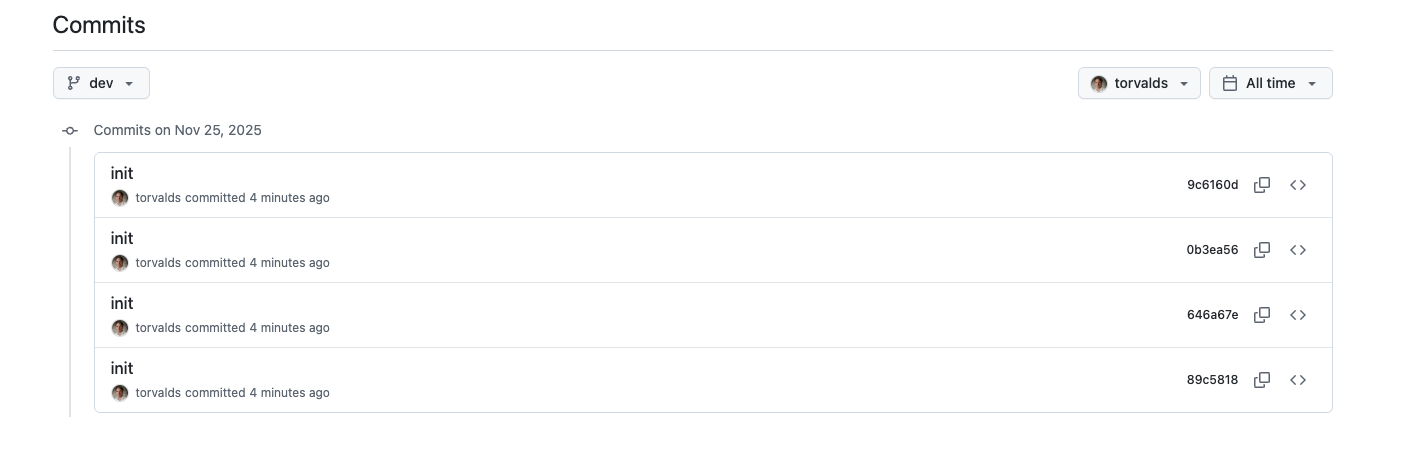
When I investigated my personal GitHub account, I found new public repositories with hashed names and the description “Sha1-Hulud: The Second Coming”. A quick Google search revealed the horrifying truth: I was one of many victims of a massive npm supply chain attack.
Understanding Shai Hulud 2
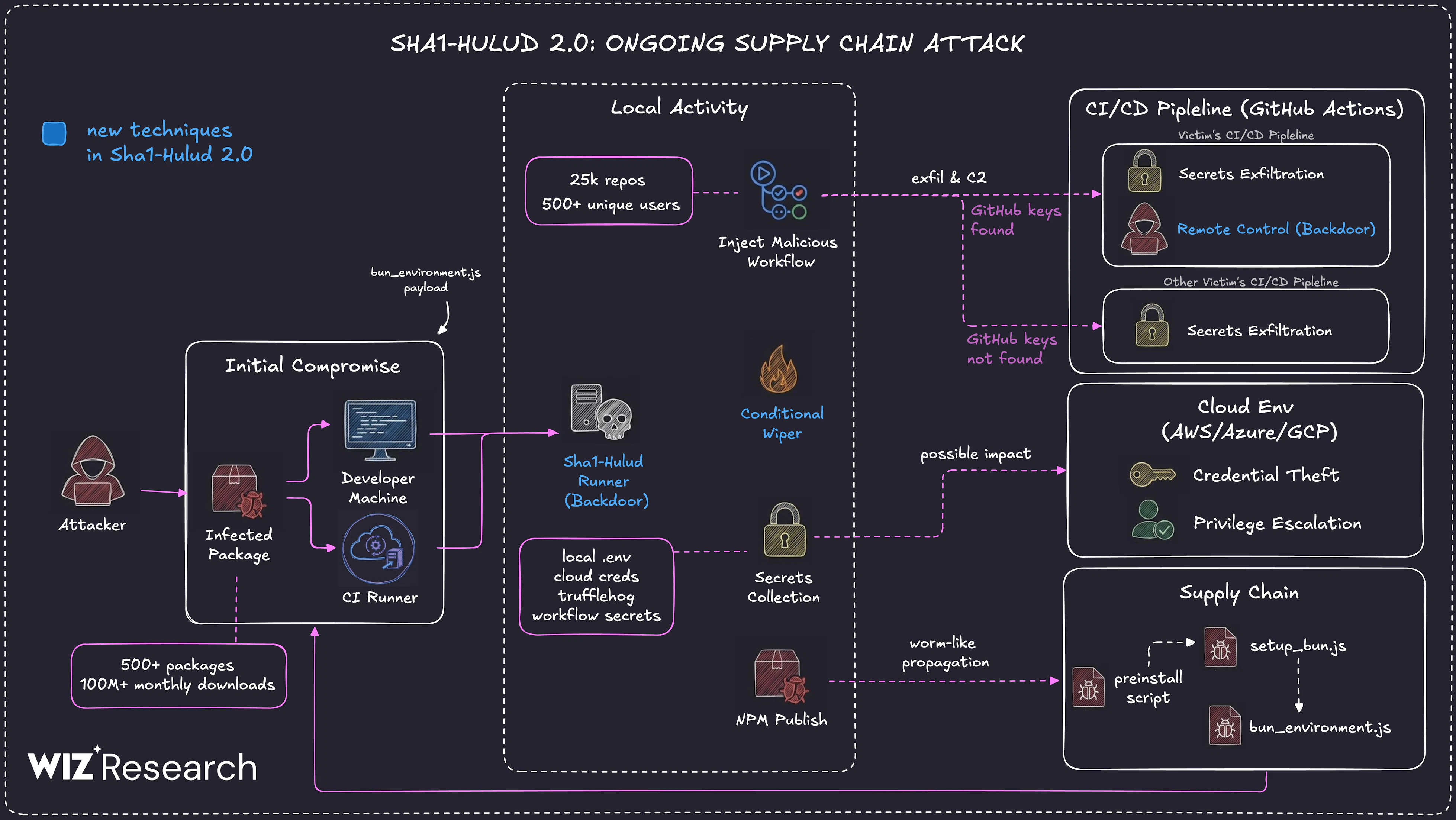
The Shai Hulud 2 attack, discovered in late November 2025, was a sophisticated supply chain attack that compromised over 600 npm packages. The attackers used malicious preinstall scripts that:
- Stole GitHub tokens and credentials
- Created malicious GitHub workflows
- Uploaded stolen data to other victims’ repositories
- Deleted repository history and created fake “init” commits
The attack affected major packages from companies like Zapier, PostHog, Postman, and AsyncAPI. The name “Shai Hulud” references the sandworm from Dune - known for its ability to transform and adapt, while “The Second Coming” indicates this was an evolved version of a previous attack.
My Immediate Response
Panic set in, but I knew I had to act fast:
- Left all GitHub organizations I was part of to prevent lateral movement
- Revoked all access tokens - GitHub tokens, npm tokens, API keys
- Started credential rotation for all services
- Checked for unauthorized repositories and workflows
The attack is devastating because repositories that weren’t copied locally can’t be retrieved. I lost some meaningless school projects and side experiments, but it could have been much worse - critical production code could have vanished forever.
What Could Have Prevented This?
Be More Strict with Postinstall Scripts
Despite coming from trusted sources, I should have been more vigilant about postinstall scripts via .npmrc ignore-scripts option or pnpm. The attack exploited our trust in the npm ecosystem.
GitHub as a Single Point of Failure
This attack made me realize that GitHub is a massive single point of failure. I don’t think it’s common for startups to backup or mirror their repositories, but maybe it should be. Local copies and regular backups aren’t just good practice - they’re essential.
Use Protection Tools
I discovered AikidoSec/safe-chain as a mitigation tool for these kinds of attacks. It’s a free protection tool that:
- Intercepts package downloads and verifies against threat intelligence
- Supports npm, yarn, pnpm, bun, and pip
- Provides minimum package age protection
- Integrates with CI/CD pipelines
Installation is simple:
npm install -g @aikidosec/safe-chain
safe-chain setup
The Bigger Picture
Taking a step back, I think we need to collectively identify solutions to avoid these kinds of supply chain attacks. The open source ecosystem we rely on is under threat, and our current defenses aren’t enough.
Some thoughts:
- Disable lifecycle scripts in CI/CD unless absolutely necessary
- Use short-lived, scoped tokens instead of long-lived credentials
- Implement dependency pinning and SBOM management
- Monitor outbound network access from build systems
- Regular security audits of dependencies and build processes
Recovery Process
After the initial panic, I had to figure out how to recover my repositories. Unfortunately, GitHub doesn’t offer a built-in “restore old commit state” beyond what Git itself retains.
If the repository hasn’t been deleted but lost files (or pushed an overwrite, malicious commit, etc.), here’s what you need to know:
- If the commits still exist in Git history/branches, you might revert to a previous commit (locally or via GitHub) to restore files
- If history was rewritten (force-push, history rewriting, etc.), which is the case here — GitHub can’t help you recover what Git itself doesn’t retain
My recovery steps:
- Cleaned my local environment - I ran
npkill -Dglobally to ensure no malicious code remained on my computer - Checked local Git history - Fortunately, I had local copies with the original commit history intact for some repositories
- Force-pushed to restore - I used
git push --all origin --forceto overwrite the malicious state with my clean local repositories
This worked because I had local copies. Without them, the repositories would have been gone forever.
Moving Forward
This attack was a wake-up call. While I managed to recover most of my important work from local copies, the experience was terrifying. The sophistication and scale of Shai Hulud 2 shows that supply chain attacks are evolving rapidly.
As developers, we need to balance the convenience of package managers with security awareness. Trust, but verify. And always have backups.
The open source ecosystem is one of our greatest assets, but we need to protect it better - both for ourselves and for the community that depends on it.